

From 3 weeks to 3 minutes: SAP Signavio now turns plain English instructions into professional process maps, powered by AI.
- Probal DasGupta
- 3 days ago
- 8 min read
Entrepreneur. Storyteller. Systems Thinker. | Architect of Enterprises That Think | Founder & CEO.
August 31, 2025
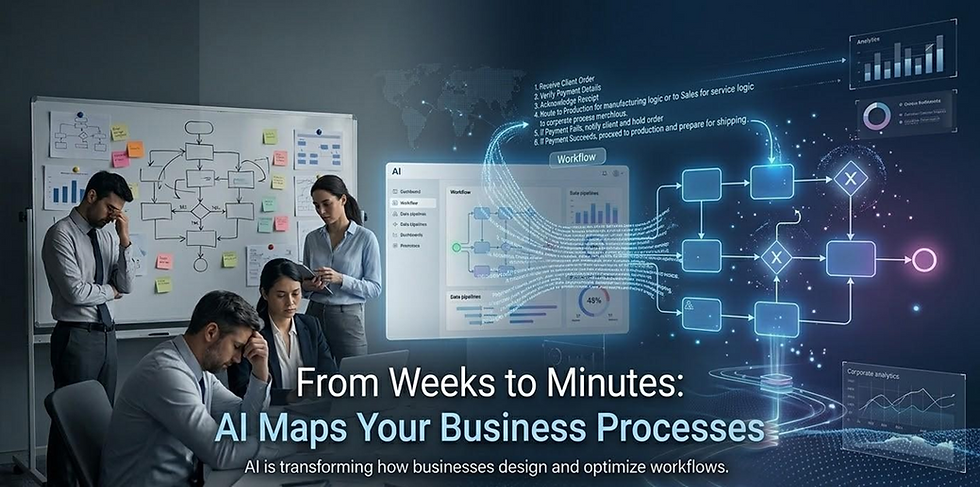
Forget spending weeks in workshops and flowchart tools. With the new “Text-to-Process” feature, you type a description like “If an order is overdue by 30 days, send a reminder; at 45 days, suspend service,” and in seconds you’re looking at a full BPMN diagram. Then, AI goes further - finding bottlenecks, predicting outcomes, and suggesting improvements.
It’s like having a business analyst who never sleeps.
Remember the last time you tried to document a business process? You probably spent hours in meetings, days wrestling with flowchart software, and weeks going back and forth with stakeholders who kept saying "that's not quite right."
Those days are over.
The Problem That's Been Hiding in Plain Sight
Here's what most companies won't admit: 70% of digital transformation projects fail during the process discovery phase. Not because the technology is bad, but because documenting how work actually gets done is painfully slow and requires specialized skills most teams don't have.
Picture this: A retail manager knows exactly what happens when inventory runs low, but translating that knowledge into a formal process diagram? That requires a business analyst, multiple meetings, and usually takes 2-3 weeks minimum. By then, the urgency is gone and the project stalls.
But what if they could just write: "If an item is out of stock in one warehouse, check the next closest location. If all fail, notify the customer," and the AI instantly generates a structured draft diagram? Analysts can still refine it, but the process starts faster and more accurately because it captures the manager's actual expertise from day one.
SAP Signavio just changed the game entirely.
What Just Became Possible
Imagine typing this sentence: "When a customer's payment is 30 days overdue, send an email reminder. If still unpaid at 45 days, suspend service. When they pay, restore access immediately."
Hit enter. Boom - you're looking at a professional BPMN diagram complete with decision gates, swim lanes, and proper notation. Think of it as prompt-to-diagram: you type a description like "When a purchase request exceeds $10k, route to Finance for approval; otherwise auto-approve," and Signavio generates a BPMN flow with tasks, gateways, and swim lanes.
Imagine a bank loan officer typing: "Applications under $5,000 get auto-approved if credit is good. Larger ones must go to senior review." In seconds, they see a professional approval workflow. What once needed weeks of diagramming is now drafted in moments. But here's where it gets really interesting: the AI doesn't just draw pretty pictures. It connects to your real business data and starts asking the questions that matter.

The "Aha Moment" Scenarios
Manufacturing Reality Check: A quality engineer describes their inspection process in two sentences: "If a quality check fails, send the part for rework. If it passes, ship it." The engineer pastes that sentence into Signavio, and the software instantly draws a process diagram with decision boxes (pass/fail) and arrows showing the next step. After the analyst adds lanes for Quality Control staff and Shipping staff, they link the diagram to factory data. The system immediately flags that 23% of parts are getting sent for rework—costing $47K monthly. The company can now weigh whether reducing rework failures or speeding up shipping saves more money. Suddenly, everyone's paying attention.
Banking Breakthrough: A loan officer maps their approval process with plain English: "If a loan is under $5,000 and the applicant has good credit, approve it automatically. Larger loans must go to a senior officer for review." AI builds a loan approval workflow with branches for small vs. large loans. When linked to real loan data, the system reveals that 40% of large loans are delayed because senior reviewers are overwhelmed. The fix becomes obvious: raise the auto-approval threshold or hire more senior staff. The tool can even compare both scenarios to show which saves more money.
Retail Revelation: A customer service manager documents their collections process: "If a customer's payment is overdue by more than 30 days, send an email reminder. If it's still unpaid after 45 days, suspend service. If they pay, restore access." Signavio drafts a billing and collections process with timelines and decision points. After adding responsibility lanes (automated billing system, customer care team, finance), they connect it to actual customer account data. The AI shows that checking nearby warehouses actually delays customer notifications by 3 hours on average, and reveals whether sending an earlier text reminder reduces unpaid bills more effectively than suspending service at 45 days. Sometimes the "helpful" step is the problem.
Beyond Pretty Diagrams: Where the Real Magic Happens
The text-to-process feature is impressive, but it's just the opening act. The real breakthrough comes from what SAP Signavio calls "AI-assisted analysis":
Instant Insights: Ask "Where do customer complaints spike?" and get a visual answer in seconds, not weeks.
Predictive Analysis: The system doesn't just show you what happened - it predicts what will happen if you change specific steps.
Sentiment Mining: Upload customer feedback files and watch the AI identify the exact process steps that frustrate people most.
Root Cause Detection: When something goes wrong, the system traces back through your processes to show you the real source of the problem.

The Five-Minute Process Revolution
Here's how teams are actually using this in the wild:
Procurement Teams (Procure-to-Pay)
Imagine a procurement officer typing: "If a supplier is flagged as high risk, send to compliance for review; otherwise auto-approve the purchase." → AI creates a flow that balances speed with risk management.
The insight: AI immediately shows that 60% of delays happen not in Finance approval, but in the initial request routing. Fix identified, problem solved.
Sales Teams (Order-to-Cash)
Imagine a sales manager writing: "If a customer's payment is overdue by more than 30 days, put the next order on hold until cleared." → Everyone can see where orders get stuck, and Finance can address it faster.
The insight: Most "technical" issues are actually billing confusion. Retrain Level 1 staff on billing, reduce escalations by 40%.
Healthcare Teams (Customer Onboarding)
Imagine a clinic manager describing: "When a patient books online, confirm insurance, schedule the doctor, and send reminders." → The onboarding flow shows where patients drop off, reducing no-shows.
The insight: Candidates drop off most between panel interview and reference check. Speed up references, close more hires.
Utilities Teams (Field Service)
Imagine a utilities supervisor entering: "If a technician fixes an issue but it reoccurs within 7 days, auto-escalate to senior staff." → The process highlights repeat-visit problems and cuts wasted time.
The insight: Most "technical" issues are actually billing confusion. Retrain Level 1 staff on billing, reduce escalations by 40%.
HR Teams (Recruiting)
Imagine a recruiter saying: "If the salary offer is below budget, auto-approve. If it's above, send to the HR Director for sign-off." → Hiring delays become visible, helping speed up candidate approvals.
The insight: Candidates drop off most between panel interview and reference check. Speed up references, close more hires.
The Numbers That Matter
Early adopters are seeing results that make CFOs smile:
Process documentation speed: 85% faster (weeks → hours). How fast can you go from describing a process to publishing a diagram? With AI, it should take hours instead of days.
Team participation: 300% increase (specialists → everyone). Suddenly, anyone who understands the work can contribute to process mapping, not just trained analysts.
Decision making: 90% reduction in "analysis paralysis". How quickly can you get answers? For example, you ask: "Where are delays happening?" and the system gives you a chart right away instead of waiting weeks for a custom report.
Process improvement identification: 10x faster discovery of bottlenecks. The AI doesn't just map processes - it immediately highlights where things slow down or break.
Cost impact: Average 15% reduction in process-related delays. When you can see problems instantly, you can fix them before they compound.
But the real breakthrough isn't speed - it's democratization. Suddenly, anyone who understands the work can map the work.

The Guardrails That Keep It Professional
With power comes responsibility. Smart organizations are putting these safeguards in place:
Quality Control Framework:
AI generates; humans validate: Every AI-created process must be reviewed by someone who actually does the work
Two-stage approval: Business users draft processes, designated process owners give final approval
Reality testing: Compare AI diagrams against actual workflow observations before publishing
Governance Structure:
Clear ownership rules: Define who can create processes vs. who can approve and publish them
Golden-source models: Maintain one official version per process to avoid conflicting documentation
Access controls: Not everyone needs editing rights - most users should consume, not create
Standards and Consistency:
Modeling conventions: Enforce consistent notation, naming, and visual standards across all diagrams
Template library: Provide pre-approved process patterns for common workflows
Integration requirements: Ensure new processes connect properly with existing enterprise architecture.
The goal isn't to replace expertise - it's to free experts from starting with blank screens while maintaining professional standards.
What This Really Means for Your Business
This isn't just a cool AI feature. It's a fundamental shift in how organizations understand and improve themselves.
Before: Process improvement was a specialized, expensive, slow activity After: Process improvement becomes part of daily work for everyone
Before: You needed consultants to see how your business really worked After: Your frontline teams can map, analyse, and improve their own processes
Before: Process documentation was a necessary evil After: Process documentation becomes a competitive advantage
The Strategic Play
The companies winning with this technology aren't just using it to draw faster diagrams. They're using it to build what I call "organizational self-awareness at scale."
When anyone can quickly map how work flows, identify bottlenecks, and test improvements, you're not just optimizing processes - you're creating a continuously learning organization. Think about it: Your competition is still in meetings arguing about how their processes work. You're already testing improvements.
Audit Analytics Scenarios with SAP Signavio
Beyond process mapping, Signavio's process intelligence capabilities are transforming how auditors and compliance teams’ work:
Duplicate Vendor Payments
Risk: Company accidentally pays the same invoice twice (fraud or error). Signavio Process Intelligence: Pulls data from SAP ERP or other finance systems and runs process-mining queries to identify invoices with same amount, vendor, and invoice date but processed twice. Audit Use: Auditors can confirm if the duplicate happened, see the root cause (e.g., manual override, lack of automated three-way match), and recommend stronger controls.
Segregation of Duties (SoD) Violations
Risk: A single user both creates a vendor and approves payments. Signavio Process Intelligence: Maps actual approval paths from system logs and flags when a user performed conflicting tasks. Audit Use: Instead of relying on policy documents, the auditor gets evidence of real violations and can recommend tighter role design or automated SoD checks.
Purchase-to-Pay Compliance
Risk: Purchases are made without a purchase order (PO), bypassing approval controls. Signavio Process Mining: Reconstructs the process: PO → Goods Receipt → Invoice → Payment, and highlights cases where the PO step was skipped. Audit Use: Auditors can show management how often controls were bypassed, the financial impact, and which departments/users were involved.
Order-to-Cash (Revenue Cycle) Delays
Risk: Revenue leakage due to slow invoicing or late customer billing. Signavio Process Mining: Tracks the time between order creation and invoice issue and identifies outliers where delays exceed company policy (e.g., >10 days). Audit Use: Provides insight into working capital inefficiencies and potential risk of misstated revenue
recognition.
Continuous Monitoring for High-Risk Transactions
Risk: Large or unusual transactions go unnoticed until after damage occurs. Signavio Dashboards: Set alerts for thresholds (e.g., payments >$500k, changes to vendor master data, or credit limit overrides) and provide auditors and compliance teams real-time notifications. Audit Use: Enables continuous auditing rather than waiting for quarterly/annual reviews.
Customer Complaints vs. Internal Processes
Risk: Complaints (e.g., about billing errors or SLA breaches) are mishandled, leading to regulatory or reputational risks. Journey Modeler + Process Intelligence: Links customer touchpoints with backend processes and shows where breakdowns occur (e.g., refund delays, missed follow-up). Audit Use: Auditors can test compliance with complaint- handling regulations (GDPR, SOX, consumer protection).
Why These Scenarios Work: Signavio uses process mining + system data so auditors don't just review policies—they see actual behaviour. It provides 100% transaction testing instead of samples, with results visualized in dashboards and flows that make it easier for executives and audit committees to understand.
In short: Signavio won't replace audit software like ACL or IDEA, but it's excellent for process-level audit analytics - catching exceptions, control failures, and inefficiencies in real time.
The Bottom Line
SAP Signavio's Text-to-Process feature represents something bigger than workflow automation. It's the beginning of a world where understanding your business doesn't require specialized skills, expensive tools, or months of analysis. It's where business intelligence meets business intuition, powered by AI that actually makes sense.
The question isn't whether this technology will change how organizations work. The question is whether you'll be leading the change or catching up to it.
Key Takeaways
Revolutionary speed: Convert plain English to professional process diagrams in seconds, not weeks
Universal access: No specialized skills required - if you can describe the work, you can map it
Instant insights: AI connects diagrams to real data for immediate bottleneck identification
Measurable impact: Early adopters report 85% faster documentation and 15% reduction in process delays
Strategic advantage: Creates continuously learning organizations that improve faster than competitors
Ready to turn your tribal knowledge into competitive advantage?

Comments